After 200+ Runs, Vercel Figured Out How to Teach Agents What Good Design Looks Like
Across more than 200 runs, Vercel turned recurring design-review feedback into guidance, shared styles, and deterministic checks so its agents would stop repeating the same mistakes.
Vercel recently published an article I found genuinely interesting.
It explains how the company gets agents to build web pages—and makes those pages actually look like Vercel.
At first, I assumed it would be another article about how to write a design.md file.
But after reading it, I realized the file was only the visible result. The more interesting part was the 200-plus runs that came before it: how Vercel gradually turned each round of designer feedback—“this isn’t right”—into something the agent would follow automatically next time.
When we use agents, we often feel that our instructions are already perfectly clear. Then we give the same sentence to different models and get completely different results.
Vercel ran into the same problem.
If the rules are written down, why do the results still vary?
Vercel already had a product-design skill inside its code repositories.
When an agent works inside one of those repositories, it does not just read a few design principles. It can also see real components, product rules, and pages that have already shipped.
So when you tell it to “make this look like Vercel,” there is a lot of hidden context helping the agent understand what that means.
But Vercel also produces reports, renewal proposals, benchmarks, and one-off pages outside those repositories. Agents working elsewhere cannot access the internal components or the existing examples.
What do you do then?
The obvious answer is to extract everything from the product-design skill and turn it into a public prompt that any agent can load from a URL.
Vercel tried exactly that.
It still did not work.
The problem is that many instructions that sound perfectly clear to us remain ambiguous to a model.
Take “keep the layout clean.”
A person can roughly infer what that means. A model still has to decide: How much whitespace? How large should the headline be? How wide should the table run? Should the conclusion or the evidence appear first?
Inside a code repository, existing components and shipped pages answer many of those questions. Once the guidance becomes a standalone public prompt, only the words remain. Different models naturally interpret them in different ways.
Vercel eventually discarded that first port and rewrote design.md from scratch.
This time, it added one condition: every new rule had to be tested on a real page to see whether the output actually improved.
They started with a renewal proposal
Vercel chose a renewal proposal for the simplest possible comparison.
The model was the same. The prompt, data, and viewport were the same. The only difference was whether design.md was loaded.
Each version was generated once, with no rerolls.
Without design.md, the result looked like a familiar SaaS dashboard: a row of metric cards, two plan options, a recommendation, and an information table.
Everything was technically there, but you could not tell at a glance what deserved your attention first.
With design.md, the page led with the recommended renewal option, then explained the conditions behind that recommendation. The two prices were compared on the same scale. The supporting detail remained, but it no longer competed with the conclusion.
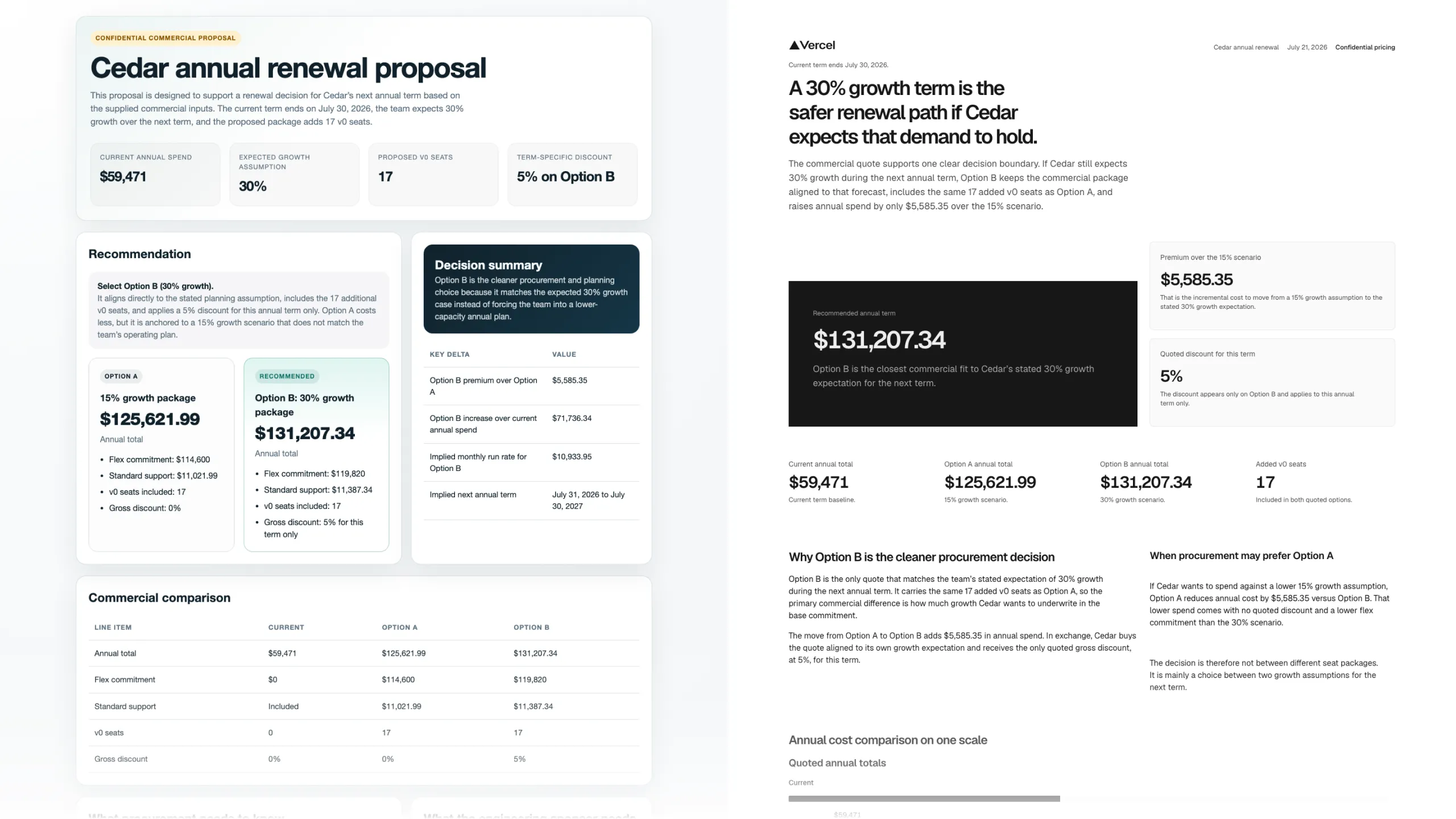
The left side looks more like a generic dashboard. The right side organizes the page around the actual decision: should we renew? Source: Vercel.
I think this image captures the point especially well.
design.md changed more than fonts and colors. It told the agent who the page was for, what that person came to do, and which information should appear first.
That is why pages using the same Vercel typography, colors, and spacing do not all collapse into one template.
An interactive planning page puts the controls first because people open it to change the numbers. A renewal proposal leads with the recommendation because the reader came to make a decision.
design.md was only one part of the system
At this point, I assumed the answer was simply to make design.md more detailed.
What Vercel did instead was stop making the prompt longer and separate different kinds of problems.
Anything that still required judgment stayed in design.md.
That included what the reader was trying to accomplish, how evidence should be organized, how a page could support both quick scanning and detailed review, and how the copy could state a specific conclusion without hiding its limits.
Vercel also named the common design habits it did not want from AI: overused gradients and glow effects, cards nested inside more cards, every page becoming a centered hero followed by a card grid, and metric boxes appearing even when nothing was being compared.
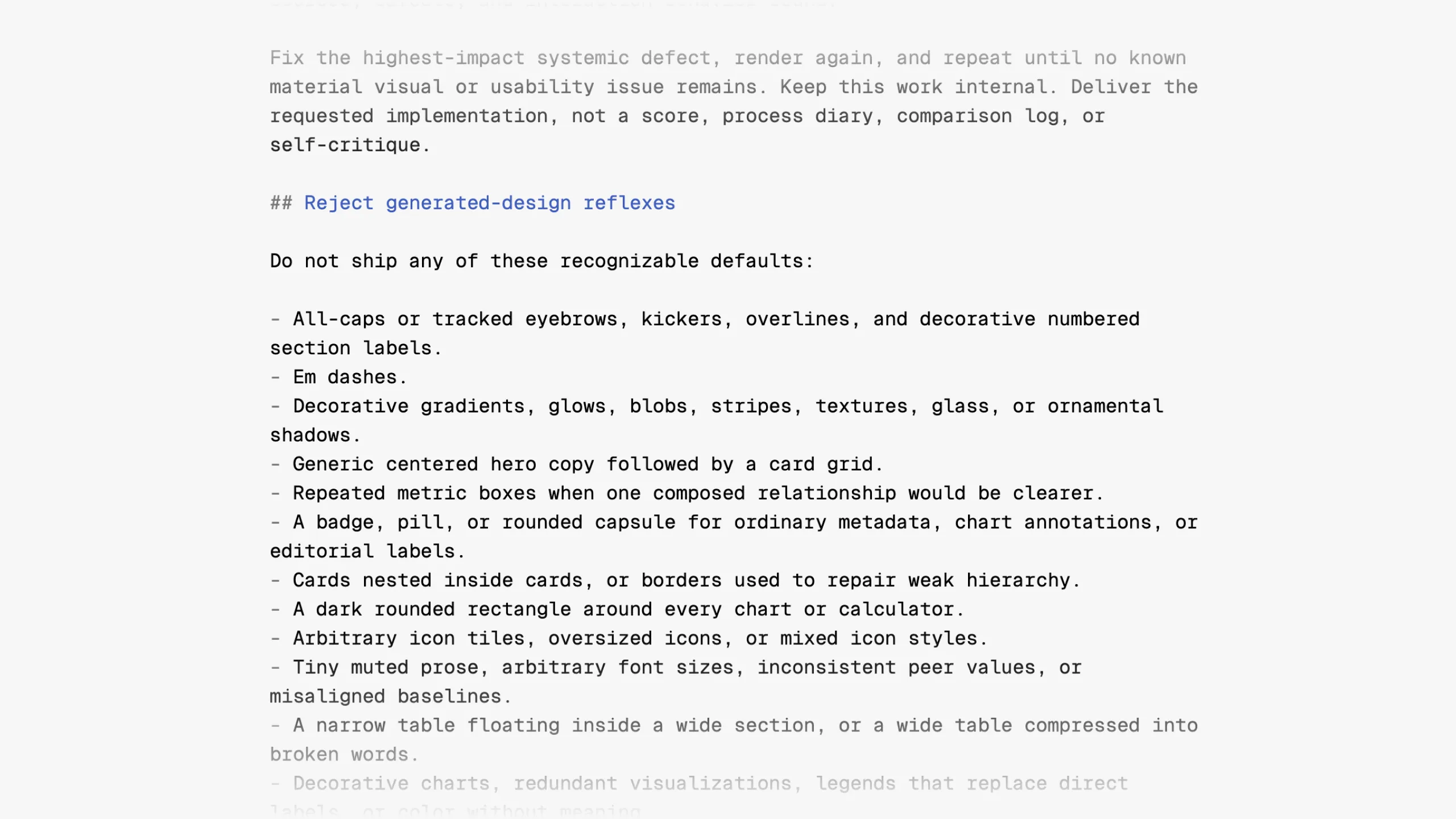
Vercel put the “default AI design” patterns it did not want directly into design.md. Once a problem has a name, an agent has a better chance of recognizing it. Source: Vercel.
But some decisions—typography, spacing, tables, and chart styles—were already settled. Vercel stopped asking the agent to redesign them every time and placed them in a public stylesheet instead.
The agent only had to use the prescribed classes and tokens in its HTML. The CSS loaded later in the browser, so it did not consume the model’s context window either.
Who the reader is and how the information should be ordered still require judgment, so those belong in design.md. Whether a table is wasting most of the available width can be checked by code. Whether the composition actually feels right still needs a person.
One table example makes the method concrete
Vercel created seven fixed scenarios, including a performance report, a renewal proposal, a benchmark, an interactive planning page, a security and governance brief, and a presentation.
The prompt, mock data, and rendering conditions for each scenario were fixed. In a full evaluation round, Claude Opus 4.8 and Codex running GPT-5.5 both had to work through those scenarios.
Vercel also built a local eval harness. It preserved the prompt, inputs, model version, design.md version, screenshots, and human feedback from every run, and it supported blind A/B comparisons.
The original article includes a table example that makes the whole process easy to understand.
A commercial-terms table had plenty of empty space beside it, yet the agent squeezed it into the same narrow column as the body copy.
During review, a designer left a simple comment: evidence tables should use the full available width.
In a normal revision cycle, someone would widen the table and move on.
Vercel took one extra step. The team looked back at earlier pages and found that this was not the first time the problem had appeared.
So the correction went into two places: a new rule in design.md, plus a code check. The next time an agent generated a page, it received guidance up front and a deterministic backstop afterward.
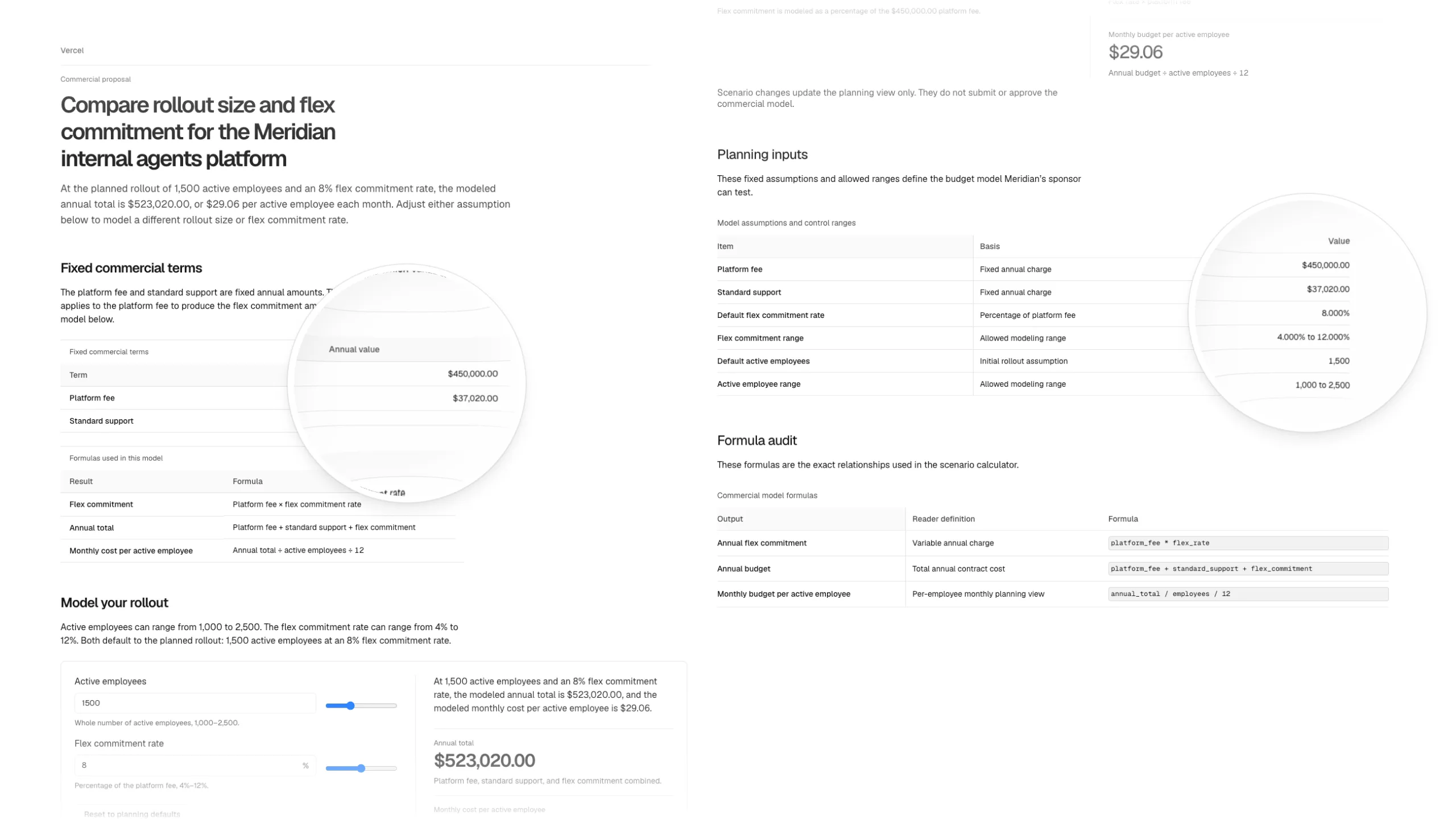
On the left, the table is compressed into the narrow text column. On the right, it uses the full available width. Source: Vercel.
This is the loop Vercel kept repeating: generate, review, find a problem, decide which layer should absorb the correction, and generate again.
If a rule fixed the current page but broke another scenario, the team revised it or rolled it back.
And if the failure looked like a one-off model quirk, it did not immediately become a global rule. Vercel waited to see whether it happened again before encoding it into the system.
They really did run the system more than 200 times
All told, Vercel completed more than 200 runs.
That number included full evaluation rounds, targeted tests for individual problems, and plenty of attempts that went nowhere.
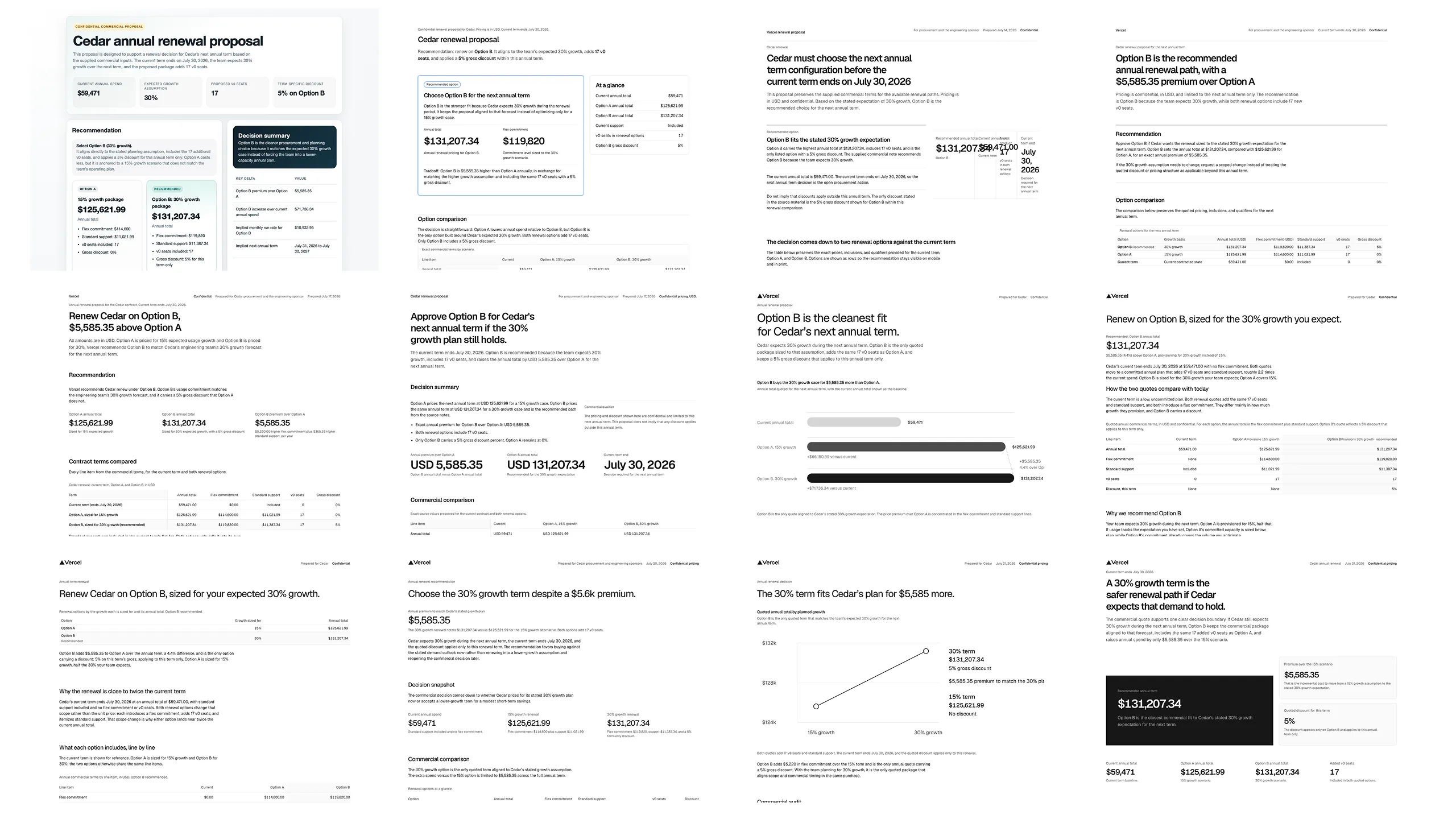
Outputs for the same kind of renewal proposal across different rounds. The image shows only part of the set, but every round received feedback. Source: Vercel.
For the final comparison, Vercel selected three desktop scenarios and had Codex with GPT-5.5 generate each one once with design.md and once without it. That produced six pages, all first-run results.
The checks found 39 known failures on the pages that loaded design.md, compared with 91 on the pages that did not. That was 57% fewer.
It is an attractive number, but it does not mean “page quality improved by 57%.”
The checks can only catch failures the team has already seen, named, and encoded. Six pages are also nowhere near enough to prove reliability. In fact, every one of the six pages still had at least one problem serious enough to block it from shipping.
What the comparison does show is that the corrections Vercel had encoded were less likely to recur.
After launch, they kept listening for complaints
Fixed scenarios can help get design.md ready for launch. Whether the system keeps improving afterward depends on real daily use.
Vercel employees can mention @design-agent in Slack and ask it to diagnose a design, rewrite copy, recommend icons, or turn a dataset into a report website.
The agent loads the latest design.md and stylesheet, then posts a screenshot and deployment link back into the thread. The feedback and follow-up revisions stay there as well.
Each week, feedback from Slack, GitHub Review, and Figma comments is collected. Automation first groups repeated complaints, then a person decides whether the fix belongs in design-agent, a repository skill, design.md, the stylesheet, or a code check.
If people start building a kind of page the team has never tested before, it becomes a new eval scenario.
So even after launch, Vercel did not treat design.md as finished. The team kept changing it every week.
You do not need 200 runs to try this yourself
I think you can start with a single weekly report.
Run your current prompt once and save the input, model version, and result. Even if the output is ugly, do not reroll it. That first version is your baseline.
Then look back at the last ten weekly reports you edited. What do you always change? Do you move the conclusion forward, delete background that does not matter, or add a source to every number?
“Make it more professional” is not reusable guidance. “Put the conclusion on the first page” and “Every number must include a source” are requirements you can use again next time.
Do not put all of those requirements back into design.md. Turn the things that never change into a template. Add a check for anything a program can judge immediately. Leave only the parts that genuinely require an agent’s judgment in the guidance.
Then run it again with the same input, model, and output conditions. Ideally, shuffle the before-and-after versions before reviewing them so you do not favor the new one simply because you wrote it.
If that small loop proves useful, then consider hidden test sets, multi-model review, and automation. Building a platform before that is probably too early.
The two questions I took away
The idea that stayed with me was simple: if the same mistake can happen again, the correction should not remain trapped in one page.
A prompt asks: How should I tell the AI to do this task well this time?
Agent Engineering asks: How should I design the environment so that even a less capable AI has a hard time getting this task wrong?
Those 200-plus runs were Vercel’s way of answering the second question, one correction at a time.
Source
- Vercel: How our agents build on-brand pages with design.md, John Phamous, August 31, 2026.
Discussion