Skip the $1000 Voice Recorder + $240/Year Subscription: I Made Voice Memos Auto-Generate Notes with OpenClaw
$0 hardware + $0 subscription + 100% local data: Turn phone recordings into structured notes automatically. 7 recording types, smart detection. Save $2000 over three years.
TL;DR
Phone’s built-in voice memo + OpenClaw = fully automated “record → transcribe → classify → structured notes.”
- 💰 Saves money: $0 hardware + $0 subscription (vs competitors’ $2000+ over 3 years)
- 🔒 Privacy: 100% local data
- 🧠 Smart: 7 recording types auto-detected, different templates for each
- 🍎 Apple-friendly: iPhone recordings auto-sync to Mac for processing
Recordings Shouldn’t End Up Forgotten
Ever had this experience?
One-hour meeting, recording done, but:
- Never want to listen to it again
- Transcription is a wall of text, finding key points is exhausting
- “Who’s responsible for this? What’s the deadline?” Can’t find it after searching forever
- Recording sits in your phone, never to be opened again
Heard an amazing talk:
- Thought “this is so insightful!” at the time
- Two days later, can’t remember what it was about
- Want to find that quote? It’s somewhere in the 45-minute recording
Recording isn’t the problem. Not having anyone organize it afterward is.
Current Solutions: Expensive, and Your Data Isn’t Yours
DingTalk A1 ($70-110), Feishu Recorder ($125), Plaud Note (~$140 + $240/year subscription)…
These devices do AI transcription + smart summaries. But after researching, a few things stopped me:
Yet another device. Phone, power bank, earbuds… bag is cluttered enough. Add a recording card?
Data lives in their cloud. Your meetings, client conversations, interview recordings—all sitting on vendor servers.
Subscription is really expensive. Plaud at $240/year means $720 over three years—almost an iPhone.
Ecosystem lock-in. DingTalk recorder only works with DingTalk. Feishu’s only with Feishu. Switch tools? Data doesn’t come with you.
My Solution: $0 Hardware + $0 Subscription + All Data Local
I built a fully automated flow with OpenClaw:
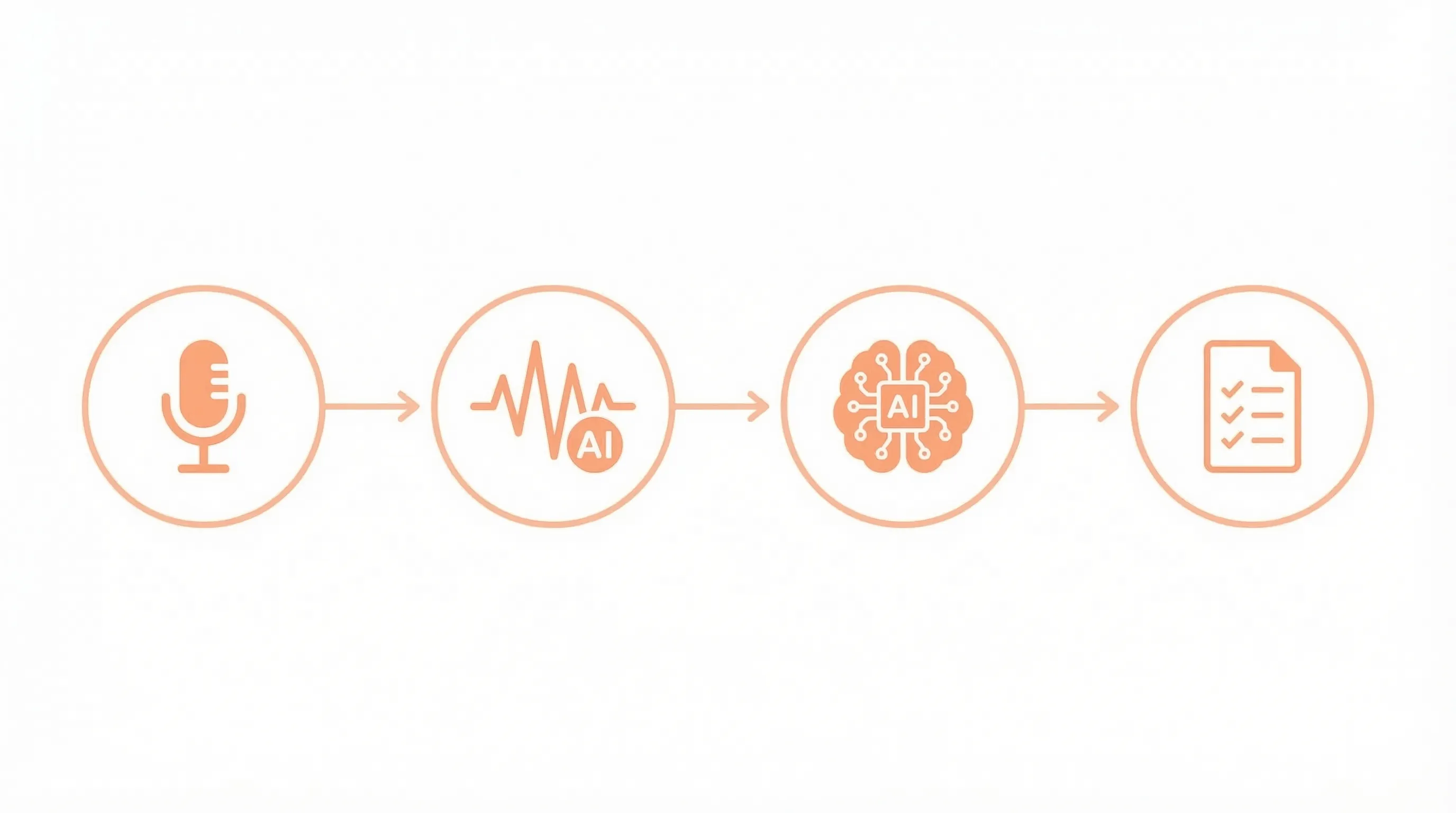
Phone recording → Auto-sync to computer → AI transcription → Smart type detection → Structured notes
If you’re an Apple user, you have a natural advantage: iPhone Voice Memos auto-sync to Mac. Record on the subway, open your laptop at home, notes are already generated.
Not an Apple user? Still works. Just specify your recording folder during first-time setup—like a OneDrive-synced directory.
Key Feature: AI Knows What You Recorded
Regular AI transcription gives you a wall of text.
My system is different: AI first determines what type of recording this is, then generates notes using the appropriate template.
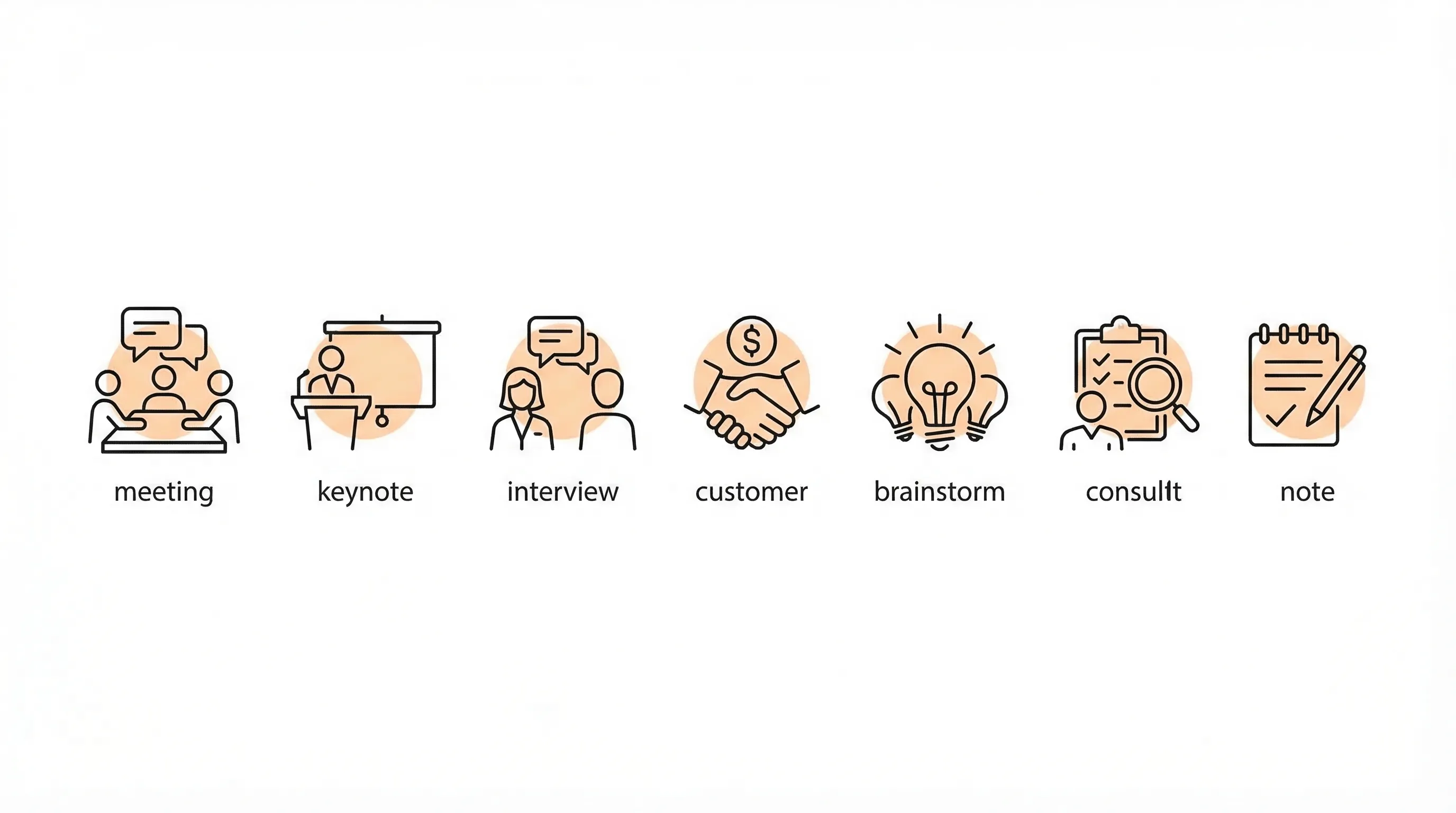
🎤 Meeting Recording → Action Items
Multi-person discussions with task assignments, AI generates:
- Meeting decisions (what consensus was reached)
- Action items (grouped by person responsible)
- Deadlines and reminders
Never miss another “can you handle this?”
🎓 Lecture Recording → Insights + Quotes
Listening to courses, podcasts, talks, AI generates:
- 3-5 core insights
- Notable quotes verbatim
- No TODO list
Why no TODOs? Lectures are for learning, not for task assignments. This matters—you don’t want AI making up action items out of nowhere.
👔 Interview Recording → Evaluation Report
HR folks and interviewers, this one’s for you:
- 5-dimension scoring: communication, expertise, logic, attitude, potential
- Each dimension gets a 1-5 score + specific comments
- Ready to archive or forward to hiring managers
📞 Client Communication → Commitment Tracking
Essential for sales, BD, customer success:
- Who promised what
- What’s the deadline
- Where are the risks
Never again “I think I promised the client something…”
💡 Brainstorm → Ideas List
For divergent thinking sessions, AI will:
- Pull out every idea mentioned
- Tag each with feasibility and priority
- Catch every “what if we try…”
📝 Personal Notes → Organized Text
For those talking-to-yourself moments, AI will:
- Clean it up into readable text
- Strip out the “um,” “like,” “you know”
- Keep the meaning intact
How Does AI Determine Type?
Four dimensions:
- People: One person → notes/lecture, multiple discussing → meeting
- Pattern: One-way output → lecture, Q&A → interview
- Content: Has “deadline,” “person responsible” → meeting, has “quote,” “contract” → client
- Keywords: Contains “candidate,” “interview” → interview
If AI is uncertain, it asks for confirmation first. You can also set it to “trust AI judgment” for auto-processing.
Real Results
Example 1: Tech Talk
Recorded a 15-minute presentation, AI auto-generated:
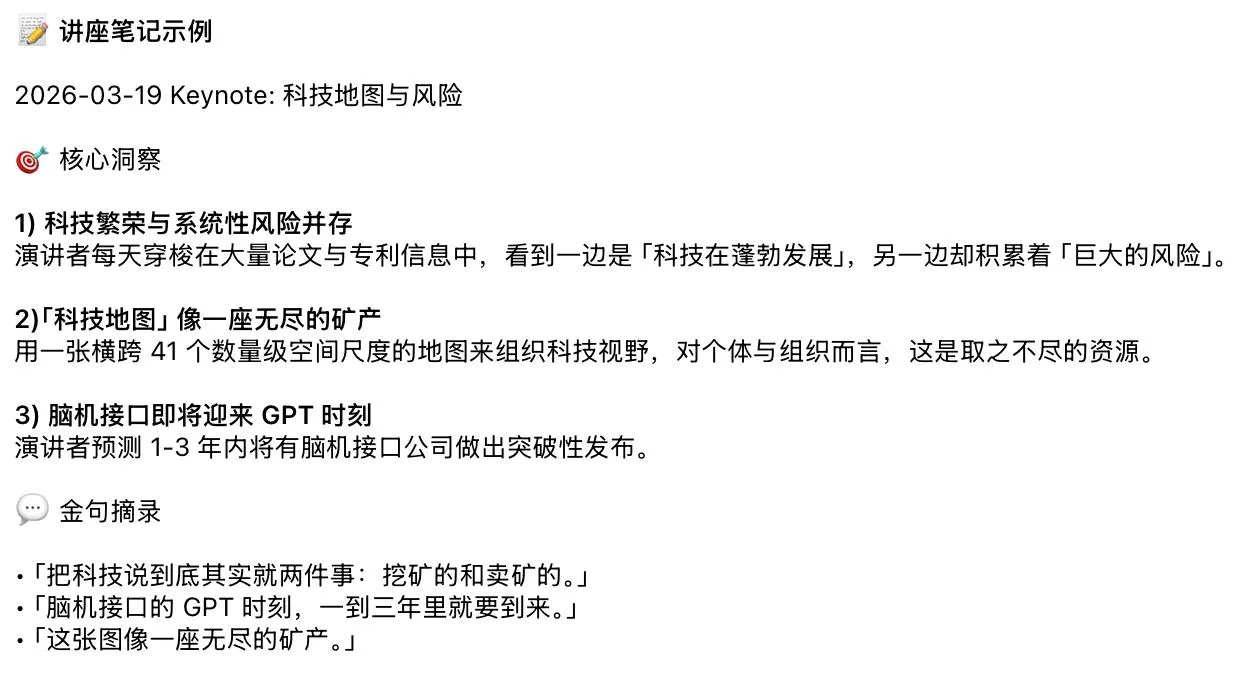
No action items. Lectures should be insights + quotes.
Example 2: Team Standup
Recorded an 8-minute English standup, AI auto-generated:
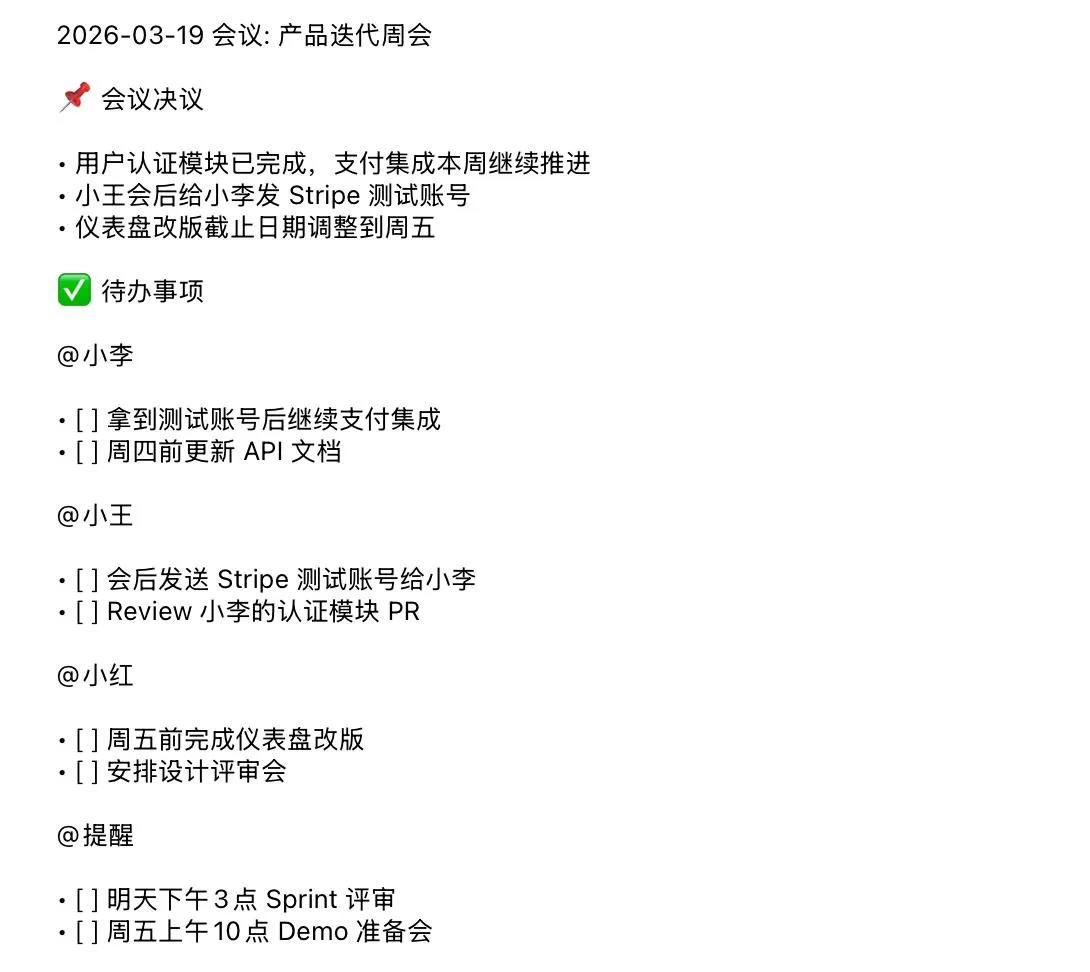
Action items grouped by person—instantly see who’s responsible for what.
5-Minute First-Time Setup
First use, AI asks you a few questions:
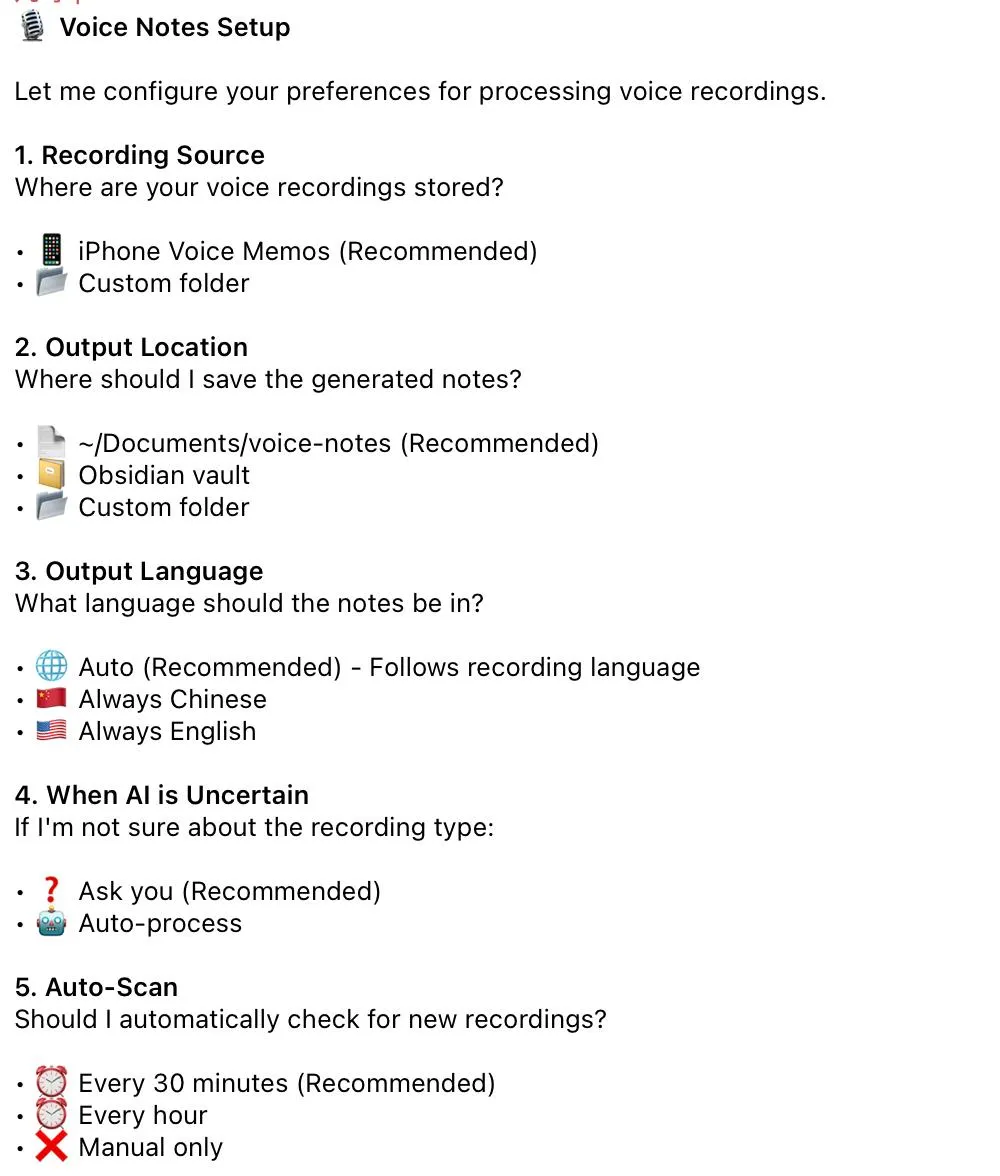
After answering, config saves locally:
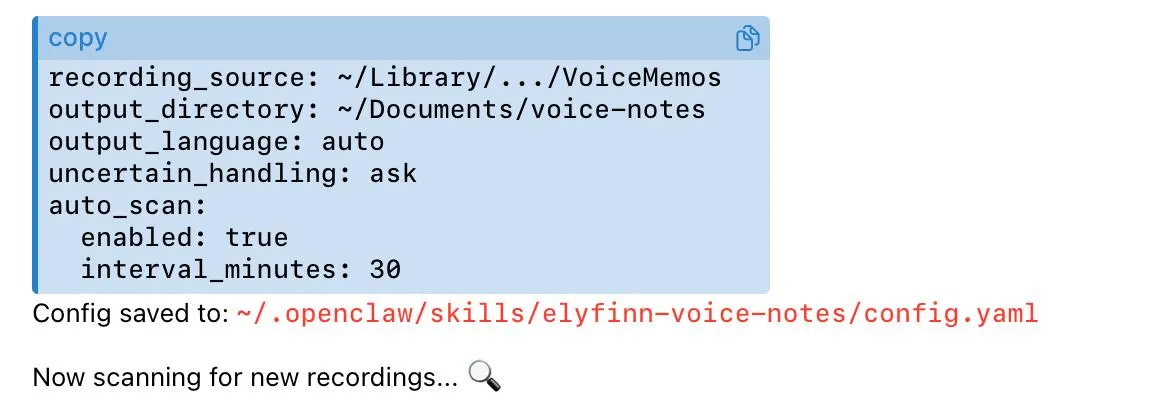
After that, it’s fully automatic. Just record, notes generate themselves.
Comparison with Voice Recorders
Hardware Cost
- Voice recorder: $70-140
- My solution: $0 (use your phone)
Annual Subscription
- Plaud: $240
- My solution: $0
Three-Year Total Cost
- Plaud: $140 + $240×3 = $860
- My solution: $0
Data Ownership
- Voice recorder: Vendor’s cloud
- My solution: 100% on your computer
Type Detection
- Voice recorder: Generic template
- My solution: 7 specialized templates
Who Should Choose What?
Choose voice recorder: Don’t want to tinker, have budget, trust vendors
Choose my solution: Apple user, privacy-conscious, like being in control
Code is Open Source
GitHub: github.com/frxiaobei/frxiaobei-skills
Directory: skills/elyfinn-voice-notes/
Includes: 7 type templates, classification logic, config system, documentation.
Give it a Star ⭐ if you find it useful. Got questions? Open an Issue.
A voice recorder isn’t the real need.
“Recording that automatically becomes usable notes” is the real need.
5 minutes to configure, save $860, and data is completely yours.
Worth it? You decide.
Discussion